
Last updated: December 9th, 2021 at 08:28 am
There is a huge number of people who use MS Outlook to perform emailing tasks on windows computers. However, when a user shifts to Apple MACOSX based computer they start using Apple Mail client. When a user requires switching from Outlook to Apple Mail with their previous data at that time user faces difficulty. The reason is transferring Outlook profile data to Apple Mail client directly is not possible. Outlook uses OST files to hold user profile data, but this file type is not workable with Apple Mail client. Apple Mail uses EMLX files for storing and importing emails.
As a result, the available option for transferring emails from Outlook OST to Apple Mail is to convert OST to EMLX files.
Now, let’s see the entire process of converting OST emails to Apple Mail-compatible EMLX files.
Also Read:- How to Export/Save Outlook Emails from OST to HTML files?
Most Reliable Technique to Save Outlook Emails from OST to EMLX Files
For Outlook, Exchange, or IMAP OST conversion to EMLX format the best method is using automated third-party software. The best tool to Convert OST to EMLX files for Apple Mail and Mac Mail is IDC OST Converter Software.
With this tool, a user can easily Export emails from OST files and save them as EMLX files. Both professionals and non-professional users can take the help of this tool to convert OST to EMLX format with ease. It also has some additional features for finishing the work of OST to EMLX file conversion in the most efficient manner.
How to Convert/Save Outlook Emails from OST to EMLX files?
- Download and Run IDC OST Converter on a windows based computer.

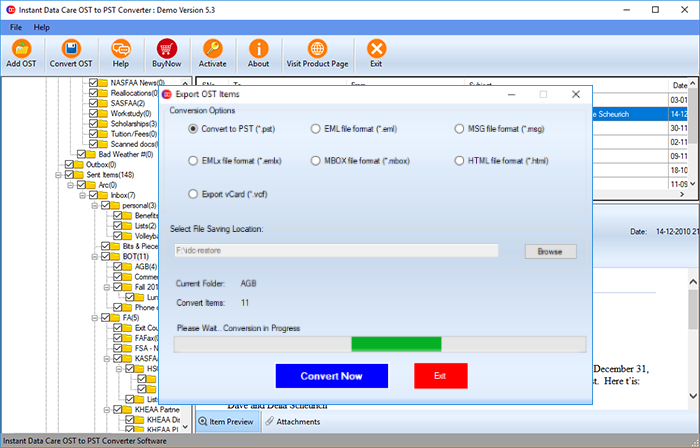
- Press the “Add OST” button on the software’s main screen.
- Then import OST into the software by pressing the browse button.

- The software will begin the scanning process and extract all directories, subfolders, and individual contents from OST files.

- Choose the needed folders from OST and click the Convert OST button from the menubar.

- Select the EMLx file format (*.emlx) from the conversion options list.
- Select a place for saving the resulting EMLX files by pressing the browse button.
- Finally, click the Convert Now button and start the process to convert OST to EMLX files with Outlook emails.
Conclusion
We have explained the complete steps to Convert/Save Outlook Emails from OST to EMLX file, in the above section of this blog post. For straightforwardly moving Outlook emails from OST to Apple Mail user can use IDC OST Converter and easily follow the steps mentioned above. The software will provide to fastest OST to EMLX file conversion and convert multiple OST files to EMLX format at the same time. To check the software functions users can try a free demo edition of OST converter.