
“Managing Calendar events in Outlook with OST files is difficult for some users. As a result, they require to Export Outlook Calendar Event to ICS files. If you are also a user who wants to do this task, this blog is for you. Here we will talk about the best method to Export Outlook Calendar Event to ICS from OST files?”
Outlook is one of those email clients that provides the facility to create or manage calendar events, in addition to email sending/receiving jobs.
While creating calendar events Outlook automatically saves its copy in data file PST or OST with other data items.
But managing a calendar with emails, contacts, or other data items within a single OST file can create several difficulties.
For this reason user, users want to Export Outlook Calendar Event to ICS like file format from OST files.
Also Read:- How to Export Outlook OST Contacts to VCF/vCard?
Difference between Outlook OST and ICS files
After account configuration Outlook creates an OST file. This file is a replica of the user’s mailbox that is available on mail servers. Outlook uses OST files to store all kinds of users profile data including- emails, contacts, calendars, etc.
Similar to OST, ICS is also a file format that uses for storing users data. But it allows users to only store calendar events. Users who want to save calendar separately prefers using this ICS file format.
Why Convert OST to ICS files?
- ICS file format is designed to save only calendar information. It helps user can save their calendar events information with ease.
- Most of the applications and devices supports ICS files for accessing and importing calendars.
- Sharing Calendar from one computer to another is also easy with ICS files.
Best Solution to Export Outlook Calendar Event to ICS from OST Files
Manually extracting calendar events from Outlook OST to ICS files are available, but it has various limitation. Also, in several situations, it doesn’t provide expected results. As a result, users prefer using third-party tools.
A quick solution to smartly Export entire calendar items from Outlook OST to ICS files is InstantDataCare OST Converter Software. With the aid of the smartest utility, a user can extract a large number of calendar events from OST files at one time.
Also, while exporting calendars from Outlook OST to ICS files, users can choose a location to save new ICS files to their desired location.
Steps to Export Outlook Calendars from OST to ICS files
- Download and open InstantDataCare OST Converter to a windows based machine.

- Press the Add OST button and from next opened window hit the Browse button.

- Import OST files that has Outlook calendars data and start scanning process by the software.

- Load all data from OST and select folders containing calendar events information.

- After folders selection hit the Convert OST button from menu bar.
- Choose Export to ICS option and click on browse to select a location for saving resultant ICS files.
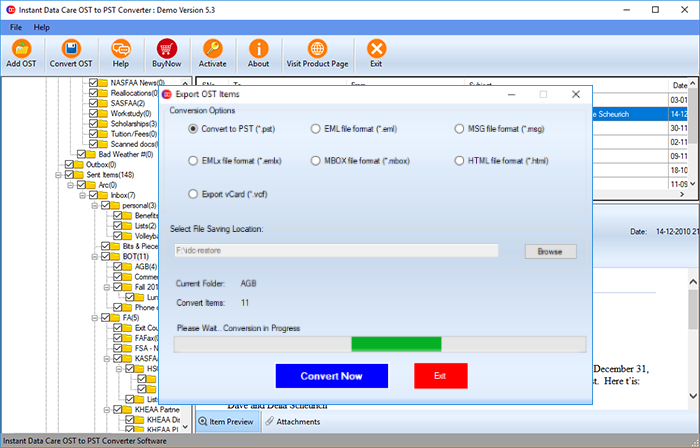
- In final step, hit the Convert Now button start the process of Exporting Outlook Calendar from OST to ICS files.
The software will now take a very small time and export all your calendar events data to new ICS files. Now all users can easily use these newly generated ICS files with any supported application without any problem.
Conclusion
For separately saving Outlook Calendars user requires to Export calendars from OST to ICS files. By doing this task with manual method users can face difficulty. So, the suggestion by every IT Expert is to use automated tools like- IDC OST to ICS Converter to accomplish this task with ease. Users can use this tool and follow the steps mentioned above to easily Extract all calendar items from OST to ICS files.