
Last updated: February 7th, 2022 at 06:53 am
Nowadays most Outlook users are want to switch from Outlook to Gmail to get features of the cloud-based emailing application. This migration process is possible if a user migrate/Import OST files to Gmail account. So, here in the article, we are going to describe an instant solution to perform this task with an easy process. Read the blog till the end to know the solution.
While using MS Outlook application, its users get the facility to configure email accounts with different settings like- POP3, IMAP and Exchange. When a user configures an account, Outlook automatically downloads and saves all users profile data as a backup in OST and PST files. These OST/PST files or Outlook contains all email, contacts, calendars and user’s profile data items.
So, for migration users requires to transfer their data from these OST or PST files to another platform like- Gmail.
Also Read:- How to Perform Lotus Notes to Gmail Migration?
Why do Users need to Import OST to Gmail accounts?
- Users requires to Import Outlook OST files to Gmail cloud application to get the benefit of accessing email account from anywhere and anytime
- For making orphaned OST file’s data again accessible users requires to Import OST files to Gmail account.
- Outlook users can access their account data with OST from a single computer. But by importing OST files to Gmail, users can access their email account from a multiple devices and computer at same time
These are some of the benefits and reasons why Outlook users require to import OST files to Gmail.
Now, check the best solution to transfer OST files into Gmail from the next section of this blog post.
Smart solution to Migrate/Import OST files to Gmail Account
In a direct manner, users can easily migrate/import OST files to Gmail/G-suite account using a solution called eSoftTools OST to Gmail Converter Software. This is the solution that will fulfil the user’s requirements for Outlook to Gmail migration. It doesn’t need any additional application installation and also performs OST to Gmail migration without Outlook requirements. In a single process, users can upload single or multiple OST files to Gmail with complete data items using this tool.
Steps to Import OST Files to Gmail/G-Suite with OST Converter:-
- Download & Launch eSoftTools OST to Gmail Converter to a windows based machine.
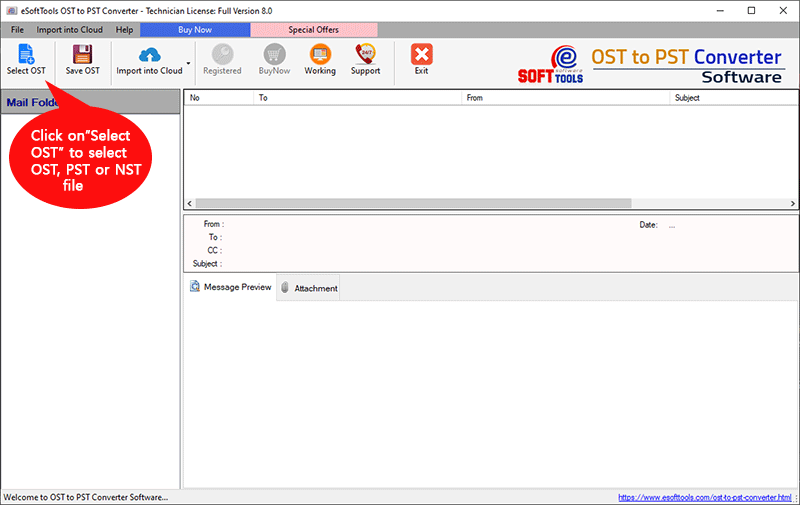
- Click the “Select OST” button from the first screen of the software.
- Select Single File Conversion or Bulk File Conversion mode and hit the Next button.
- Import all your needed OST files into the software and click the Start Scanning button.

- Get preview of emails and other items from OST files and choose required folders.
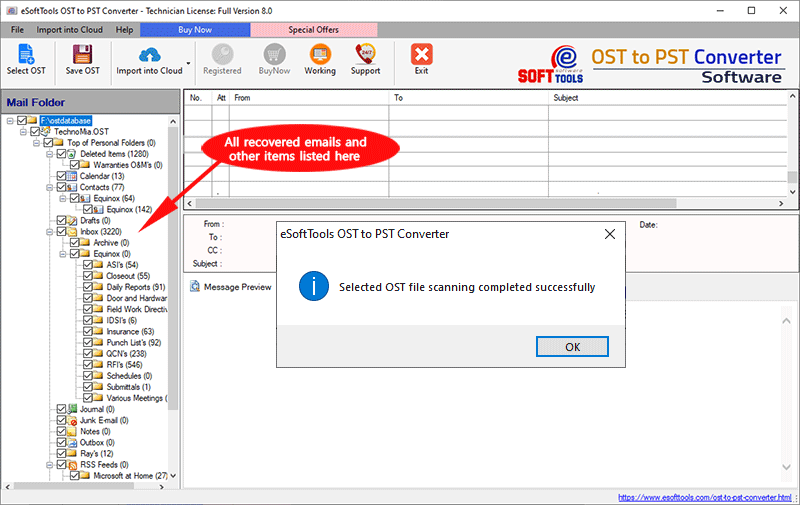
- Press the Import to Cloud >> Import OST to Gmail button from menu bar.

- Fill the email address and password field then press the Authenticate Login button.
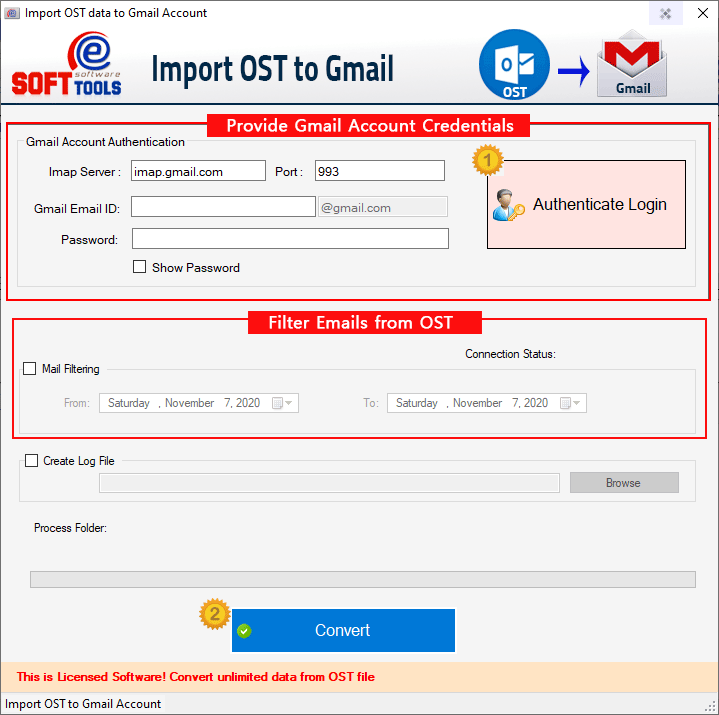
- After login to Gmail account apply mail filter option and hit the Convert button.

Now the software will start the process of transferring entire data from OST to Gmail account and provide you instant results.
Conclusion
Users prefer cloud-based applications more than desktop-based applications. For this reason, the user needs to switch from Outlook to Gmail cloud by importing OST files. Users who want to do this task in a simple and reliable manner must use the method mentioned above. Now take the assistance of the free demo edition of OST to Gmail Converter and start importing OST files to Gmail for free.