
Last updated: January 31st, 2022 at 09:40 am
Many Lotus Notes users now want to switch to cloud based emailing services like- Gmail/G-Suite. If you are also one of those users who wants to perform this task, you can get your solution here. In this article we will show you the complete steps on How to Perform Lotus Notes to Gmail Migration.
Lotus Notes has the trust of many users and businesses for secure emailing. Not only for emailing but also Lotus Notes provides various more functions to its users. But desktop-based applications are now an outdated service and now users mainly prefer using Cloud-based services like- Gmail/G-Suite.
Gmail provides the facility of accessing email accounts from different places and devices at a single time. Also, Gmail allows users to save their mailboxes on cloud service which is far better and more secure than saving data locally.
To get these benefits users requires to switch from Lotus Notes to Gmail/G-suite. Now know the best solution to Perform Lotus Notes to Gmail Migration by reading the next section of this blog post.
Also Read:- How to Import Outlook OST to Zimbra Desktop client?
Smart technique to Migrate from Lotus Notes to Gmail/G-Suite
A direct solution to transfer data from Lotus Notes to Gmail account eSoftTools Lotus Notes to Gmail Migration Software. Using this advanced program in simple steps users can upload NSF files with complete data to their Gmail account.
With NSF files and just putting Gmail account login credentials, a user can move unlimited data from NSF files to Gmail. Also, a user can import a single as well as multiple NSF files to Gmail at once.
In addition, users also get mail filter by date, log file creation and a preview of lotus note data like advanced features with this tool.
Steps to Import Lotus Notes NSF to Gmail Account using NSF Converter
- Download and Launch eSoftTools Lotus Notes to Gmail Migration Software.

- Firstly, click the Select NSF button from its first screen.
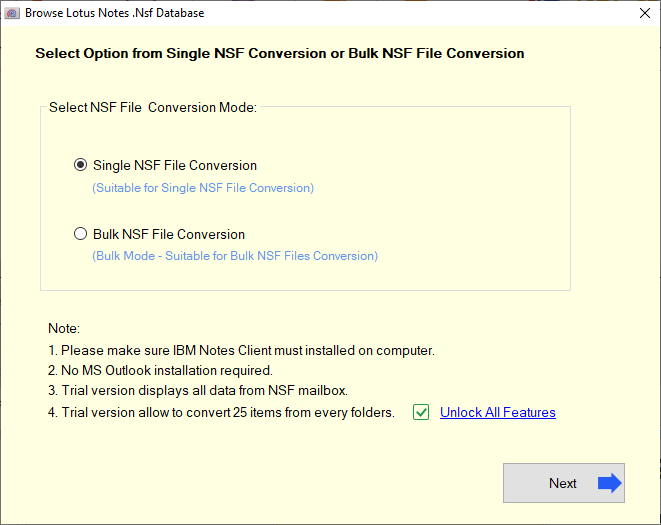
- Choose Single or Bulk file conversion mode and press Next button.
- Import NSF files in the software and extract all mail folders and other data.

- Choose required folders from NSF files and hit the Import to Cloud >> Import NSF to Gmail button.

- Enter your Gmail email ID and Password and press the Authenticate Login button.
- Use Mail Filter option and set dates to export email of required dates.
- Finally, hit on Connect & Import to start the process of importing Lotus Notes data to Gmail/G-suite account.

Conclusion
Through this blog post, we have described the best techniques for users to directly transfer Lotus Notes data to Gmail accounts. Users can try the NSF converter software of eSoftTools to perform the Lotus Notes to Gmail migration with simple steps. To check the software function users can also take the help of the free trial edition of NSF Converter Software. Using this demo edition users can Import NSF files to their Gmail account directly with up to 25 items from each folder without any charges.