
Last updated: December 5th, 2021 at 04:08 pm
Every user’s first choice for doing emailing activities is Microsoft Outlook mail client. Outlook accounts in a variety of ways for configuring an email account such as IMAP, POP, and Exchange settings. After account configuration, Outlook saves all user’s account data in PST and OST files. Both of these Outlook file formats allow users to save all of their emails, contacts, calendars, and other data locally on their computers.
Mainly Outlook produces an OST file when a user configures his Exchange or IMAP account. Through this OST file, a user can access their mailbox data in offline mode. There are various benefits of these OST files, but in various situations, Outlook users require to convert OST file to PST file format.
Now the question is, what is the best way for doing this task? Before we look at the method, let’s look at why a user would need to convert OST file to PST.
Also Read:- How to Import OST file into Outlook 365 Directly?
Why Convert OST to PST Outlook Files?
Users may need to convert OST to PST files of Outlook for a variety of reasons, including:-
- To move data from an old OST file to a new Outlook profile.
- For recovering data from inaccessible or corrupt OST files
- Importting an Orphaned OST files directly in Outlook is not possible, for this reason user also needs to Convert OST file to PST.
- When a user needs to take backup of their OST mailbox items, OST to PST Conversion is the best option.
Users may need to convert OST to PST files, because of any one of the aforementioned scenarios. Now, let’s see the easiest technique to perform OST to PST file conversion in the following section.
Smart Solution to Convert OST to PST file For Outlook
Users can use a variety of techniques to convert OST files to PST files that are available on the internet. But you’ve done everything and aren’t getting the results you want. Then we suggest using superior automatic software such as InstantDataCare OST to PST Converter Software.
This quick solution will allow users to convert OST file to PST files as well as allow you to recover lost mailbox items from OST files. It allows to recover and convert corrupt, orphaned, encrypted, inaccessible, or healthy OST files to PST files. Also, it can transfer all mailbox items, including email, contacts, calendars, and other items from OST to a new Outlook PST file by following some simple and easy steps.
How to Convert OST File to PST Outlook Using IDC OST to PST Converter?
- Download and launch this IDC OST to PST Conversion Tool to your computer

- Select the appropriate OST file for conversion by clicking the “Add OST” button.
- From the next screen click the browse button and select OST file from its location.

- Software will opens OST files and start the scanning process quickly and recovers all existing OST directories and sub-folders

- Now choose required folders from OST files from the preview panel and press the Convert OST button.

- From Conversion options list to save OST items choose the Convert to PST(.pst) radio button. (a user can also convert OST to EML, EMLX, MSG, HTML, MBOX, and vCard files)
- Finally, select a location to save resultant PST files and click on Convert to begin the OST to PST file Conversion process.
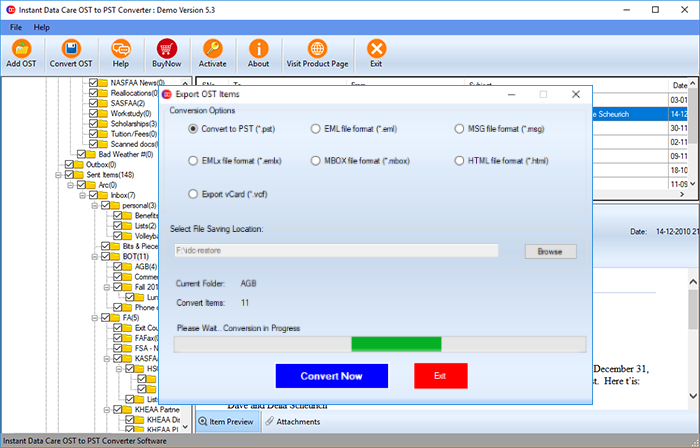
Now, in a very short time, this software will complete the conversion task and provide a resultant PST file with all OST file’s data items.
Conclusion
As we all know, OST files contain a lot of important data of users. Using any manual method to do the process is not simple and also a single mistake can create a huge problem for users. As a result, the recommendation to all users is to use automated Instantdatacare OST to PST Converter Software. Users can use this tool and apply the above-given steps to simply convert Outlook OST to PST file with any mistake.