
Last updated: December 5th, 2021 at 06:56 pm
Want to export emails from OST database file of Outlook and save them as EML format? If yes, yoy can get your answer here by reading this blog post. Read this complete article to get all information about how to convert OST to EML files step by step.
Every user who uses the Windows operating system on their computer prefers using Microsoft Outlook application for emailing. This program has the power to perform emailing task in a secure manner. In addition it also provides the facility of keeping users’ profile data in an OST data file locally. A single OST file comprises a large number of data elements, such as emails, contacts, calendars, and so on.
With OST files data saving and managing in Outlook is easy, but in various situation user of Outlook requires to save emails in separte files. For separately saving Outlook EML files is the best techniques. Also, a more than 30+ file format uses and supports this EML file type.
As a result, users of Outlook needs to Export their emails or Convert OST to EML files.
Also Read:- How to Convert OST File to PST in Outlook?
Smart Solution to Export/Convert Outlook OST to EML files with Emails
If you search for any manual method to convert Outlook OST to EML file you will get nothing, Because there is no direct way to this process. Users to who wants to perform this OST to EML file Conversion task. The only solution for them is using automated solution.
The best solution to Export OST to EML with email items is InstantDataCare OST Converter Software. This tool will convert OST to EML with a huge number of emails at the same time. It can convert corrupt, inaccessible, healthy, OST files for exporting emails and making OST to EML Conversion. Also, it is workable with OST files of all recent versions of Microsoft Outlook.
How to Export OST emails to EML files using IDC OST Converter tool?
- Download and run IDC OST Converter to your machine.

- Press the “Add OST” button, from the first screen of the software.
- Next, click the browse option and navigate to the OST file and add it in the software.

- Opens OST files and begins scanning process and extract all folders/sub-folders and individual items from OST file.

- From the preview panel, choose the needed folders and hit the Convert OST button.

- After this from conversion options list, select the EML file format (*.eml).
- Choose a location to save the Outlook EML files.
- In the last step press the Convert button to begin the process of export Outlook emails to separate EML files.
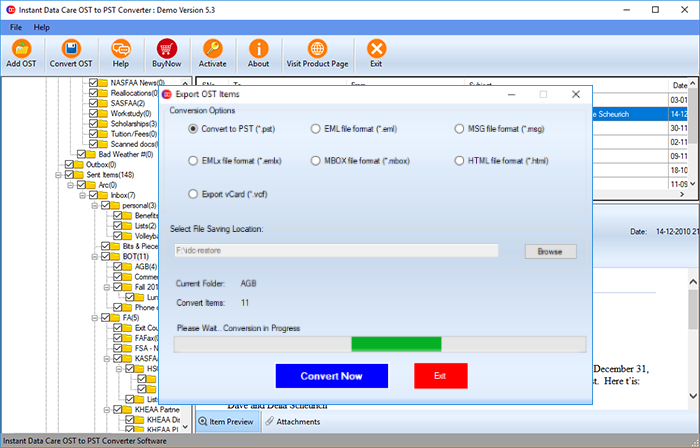
Now the software will save all the Outlook OST file emails as EML files to users specified location. Usercan access these EML file with newer version of Outlook and other supported applications
Conclusion
This article we have written for users who want an answer for question “how to convert/export OST to EML files”. A user may easily export emails from Outlook OST to EML files by following the methods outlined above. After applying the above mentioned steps with IDC OST Conveter users will be able to view their Offline OST file’s emails Windows Live Mail, Thunderbird, Outlook Express, and a variety of other applications. To check software features and working process, quickly download and try its free trial version.